

Description
Download ColorPen Sketch APK – Color Palette Creator, Drawing Tool, Android App, Free Software, Design Utility
Overview
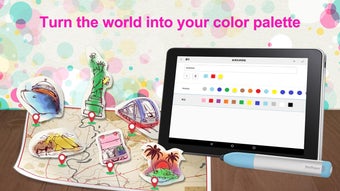
ColorPen Sketch is a free Android application developed by Penpower Inc. designed to empower users with tools for transforming photos into line drawings and crafting personalized color palettes. The app serves as a creative utility for individuals interested in digital sketching, color exploration, and design inspiration. It enables users to convert images into clean line art, recolor them using a variety of brush options, and extract colors from real-world environments through a compatible hardware accessory, the PenPower ColorPen. This functionality makes it particularly useful for graphic designers, illustrators, and hobbyist artists seeking a seamless bridge between physical inspiration and digital creation. The app supports 20 built-in coloring pages, offering immediate creative opportunities for users who want to experiment without starting from scratch. Real-world usage scenarios include on-the-go design ideation, color matching for branding projects, and sharing digital artwork across social platforms. The developer did not provide additional information about the company’s background beyond the app’s name and release details. The app was released on April 10, 2024, and is currently available for free download on Android devices.
Key Features & Capabilities
- Photo-to-Line Drawing Conversion: Users can upload photos and transform them into clean, stylized line drawings suitable for coloring or further digital manipulation.
- Personalized Color Palette Creation: The app allows users to extract colors from their surroundings using the PenPower ColorPen accessory, enabling real-time color capture and digital storage.
- Four Brush Types: Offers multiple brush styles to suit different artistic preferences, supporting varied line weights and textures during sketching and coloring.
- Color Fill Function: Enables users to fill enclosed areas with selected colors, streamlining the coloring process for both beginners and experienced artists.
- Adjustable Color Parameters: Provides control over hue, saturation, lightness, and transparency to fine-tune color appearance and achieve desired visual effects.
- 20 Built-in Coloring Pages: Includes a curated selection of ready-to-use templates for immediate creative engagement.
- Export and Sharing Options: Drawings can be exported as PNG files and shared via email, cloud storage, or social media platforms.
- Integration with Design Software: Extracted color codes can be used in external applications such as Photoshop, enhancing workflow continuity.
These features support efficient creative workflows, particularly for users who value color accuracy and design consistency. The ability to capture real-world colors and apply them digitally adds a unique dimension to the app’s utility. While the full functionality relies on hardware integration, the core drawing and coloring tools remain accessible without additional devices.
User Interface, Workflow & Performance
The user interface of ColorPen Sketch is designed for intuitive navigation, with a clean layout that prioritizes access to core tools. The main screen provides quick access to photo import, drawing modes, color selection, and export functions. The workflow is structured around a step-by-step process: import image → convert to line drawing → select brush and colors → sketch or color → adjust settings → export or share. This logical progression supports ease of use, especially for users new to digital art tools. The app appears to be optimized for touch-based interaction, with responsive controls and visual feedback during drawing. The developer did not specify resource usage details, so exact performance behavior in terms of CPU or RAM consumption remains unknown. General software behavior patterns suggest stable operation under normal usage conditions, though prolonged sessions may vary depending on device capabilities. Stability and responsiveness are expected to be consistent with typical Android applications of this category. No reports of crashes or bugs were mentioned in the provided information.
Compatibility & System Requirements
ColorPen Sketch is designed for Android devices and was released on April 10, 2024. The app is available as a free download, though the exact installation size was not specified. Platform compatibility information is limited to Android, with no details provided about minimum OS version, screen resolution, or hardware requirements. The developer did not list specific system specifications or device compatibility beyond the operating system. Users should ensure their device runs a compatible version of Android to install and run the application. For optimal performance, it is recommended to use a device with sufficient storage and processing power. The app requires Bluetooth to be enabled for connection with the PenPower ColorPen accessory, which is necessary for full functionality. Exact performance details were not specified.
Pros and Cons
Pros
- Free to download and use with no hidden costs.
- Intuitive interface suitable for both beginners and experienced artists.
- Supports real-world color capture via compatible hardware.
- Offers 20 built-in coloring pages for immediate creative use.
- Highly useful for graphic designers and illustrators seeking color inspiration.
- Exportable drawings in PNG format for use in other software.
- Easy sharing via email, cloud storage, and social platforms.
- Adjustable color parameters for precise customization.
Cons
- Full functionality requires Bluetooth and the PenPower ColorPen accessory.
- Exact system requirements and performance metrics were not provided.
- Limited to Android platform; no support for iOS or desktop operating systems.
- Dependence on external hardware may reduce accessibility for some users.
- App may not be optimized for older or low-end Android devices.
FAQ Section
Is ColorPen Sketch available for iOS devices?
As of the current release, ColorPen Sketch is only available for Android devices. There is no information indicating support for iOS.
Do I need to buy the PenPower ColorPen to use the app?
The app functions without the hardware accessory, but full features such as real-world color capture require the PenPower ColorPen and Bluetooth connectivity.
Can I use ColorPen Sketch offline?
Yes, the app supports offline usage for drawing, coloring, and exporting. However, Bluetooth connection is required for hardware integration.
Is the app safe to download and use?
ColorPen Sketch is a free Android app developed by Penpower Inc. It does not contain known malware. As with any app, users should download it from official sources to ensure security.
How often does the app receive updates?
The app was released on April 10, 2024. No information about update frequency or future development plans was provided.
Final Thoughts
ColorPen Sketch stands out as a versatile and accessible tool for digital artists and designers seeking a streamlined way to create personalized color palettes and convert photos into line drawings. Its integration with physical color capture hardware adds a unique advantage for professionals and creatives who value real-world color accuracy. While the app’s full potential depends on an external accessory, the core drawing and coloring features remain robust and user-friendly. The inclusion of 20 built-in coloring pages and export options enhances its utility for both casual users and professionals. The app is free to download and use, making it an excellent entry point for those exploring digital art and color theory. For anyone interested in creative expression, design inspiration, or color-based workflows, ColorPen Sketch offers a practical and engaging experience. Download ColorPen Sketch now.
Guides & Tutorials for ColorPen Sketch APK
How to install ColorPen Sketch APK
- Click the Preview / Download button above.
- Once redirected, accept the terms and click Install.
- Wait for the ColorPen Sketch APK download to finish on your device.
How to use ColorPen Sketch APK
This software is primarily used for its core features described above. Open the app after installation to explore its capabilities.
User Reviews for ColorPen Sketch APK 0
No reviews found





